As a Basis Consultant you face a couple of incidents opened by customers related to high swaps in transaction ST02. Before diving deep into it let’s understand what a buffer is ?

Table Buffering in SAP ABAP is a concept in ABAP Tables to enhance performance (10 to 100 times) and reduce time of processing (accessing) the table.
A Buffer is an interface between Database layer and Application layer. Application Layer communicates with Buffer and the Buffer communicates with Database layer and vice-versa.
What is actually happening ?
Whenever an Open SQL statement is used to read a record, The data buffer is checked first to see whether it is there. If not, the data is read from the database. If the table's attributes indicate that the data should be buffered, the record is saved in RAM on the application server in data buffers.
Later, if that record is read again, it is read from the buffer instead of the database.
By buffering data, you increase performance in two important ways:
The programs using the buffered data run faster because they don't have to wait for it to come from the database. This reduces delays waiting for the database and the network that connects it.
The other programs that need to access the database run faster because there is less load on the database and less traffic on the network.
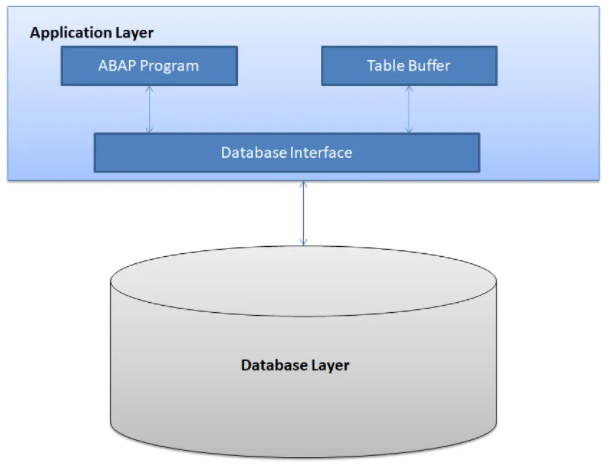
These buffers are also known as client caches. SAP buffers occupy memory areas that are local to the work process, and in individual shared memory segments that can be accessed by all work processes. These memory areas are executed for the application server.
Each SAP instance (application server) has its own buffers
The data that is buffered includes ABAP programs and screens, ABAP Dictionary data, and company-specific data. Typically these remain unchanged during system operation.
Adding a terminology here HIT Ratio :- Number of times we look for a data and it is available in buffer , We say that as HIT. A higher HIT ratio states a better state of the system.
I think by now you understand what a buffer is, we will drop another blog mentioning the different types of buffer and issues we face in the real world. Comment and let us know your doubts and queries.
Read More :-
Comments
Post a Comment