Hey everyone, putting forward a common error we usually face when we have “Excel inplace” functionality enabled in our SAP system.
This error occurs when validity of the signature of SAP standard templates expired or were incorrectly delivered via support packages.
We can reproduce the error by doing as below..
Click on “spreadsheet” icon after any SAP ALV grid view of data is on screen to make this data to export into excel directly from SAP.
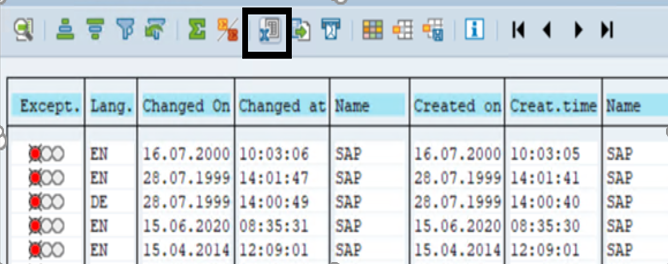
But, instead of exporting into excel you will see below pop-up.
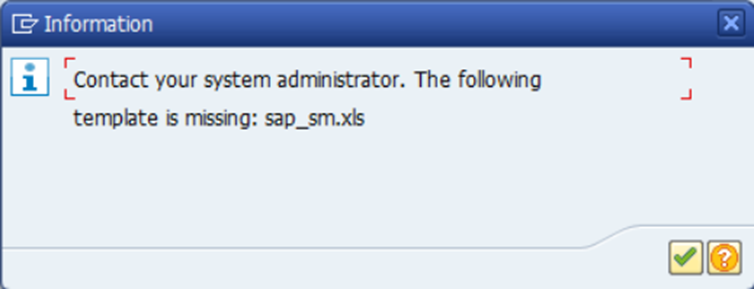
To overcome this, we need to place a valid standard template in system by removing the old ones.
Best Approach :
1. check and remove duplicate entries of template and check if issue is resolved.
2. if issue still exists, delete the old templates from 000 client.
3. upload the new template into 000 client and if this solution needs to be transported to next landscape(from dev to prod) use check box "transport request" and capture the template in TR.
4. Test the template using report BCALV_BDS_MAINTENANCE.
Solution:
To check the existing templates, delete the old templates(the expired ones) or to upload new templates.
- Follow SNOTE : https://me.sap.com/notes/0001937247
- Follow SNOTE : https://me.sap.com/notes/1686797
Important things to know before Appling the solution :
- Anything related to templates should be done from 000 client.
- Only SAP_SM.xls and SAP_SM.xlsm is
needed in the system from the SAP standard templates. (Sap_om.xls and
sap_mm.xls files aren’t required anymore.)
- Above SAP Basis 700 it is
possible that templates exist only in CLIENT 000 and the business client
can use them from there. This is recommended by SAP.
- Mixed template uploading cause
errors which means that if one template is uploaded to business client the
system will search every template there and won’t use them from client
000.
- Template duplication causes error.
References :
ReplyDeleteExtremely useful information which you have shared here erp customer service